
Ombi
TidusJarEntertainment
4.7171.00 Reviews
- Version
- 2.25.0
- Installs
- 10.00K
- Age Rating
- Everyone
Screenshots
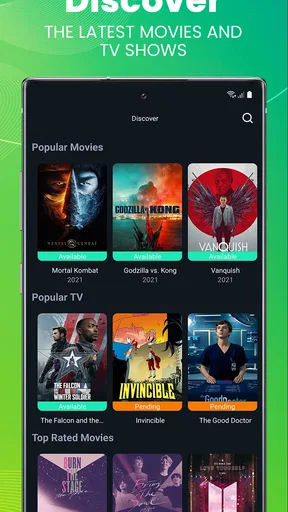
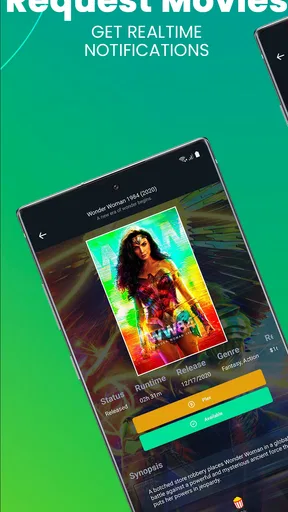
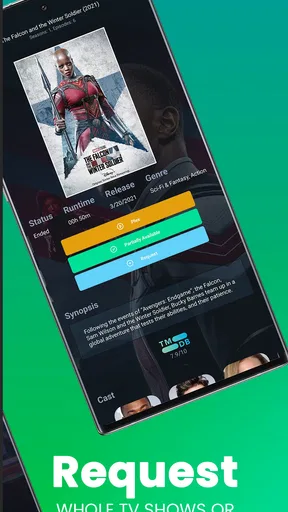
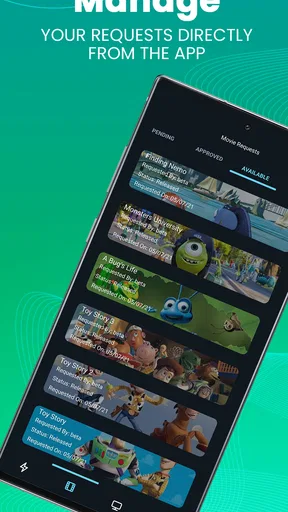
Our Review of Ombi
 Analysis by Appyee
If you're the kind of person who loves to immerse yourself in movies and TV shows, you've probably wished for a way to easily request content from your media server. Well, let me introduce you to Ombi, the app that might just become your new best friend in the world of media requests. It's like having a friendly concierge who knows exactly what you want to watch.
The first-week appeal: fewer messages, clearer requests
The initial attraction is easy to understand: instead of texting a server admin with a title and hoping they see the message, a viewer can make a request through a shared interface. That change is small, but it removes the awkward back-and-forth of asking whether a film is already available or whether someone has remembered to add a show. The request has a proper place, and the person maintaining the server can review it there.
I’d recommend this setup most to households or friend groups where several people use one media server but only one or two people manage it. It gives the other viewers a way to express what they want without giving them the keys to the server itself. If you already have a server but requests are scattered across chats, notes, and verbal reminders, that separation can be useful from the first few days.
A practical tip is to agree on how requests will be handled before inviting everyone in. People may assume that a submitted title will appear immediately, when the admin may still need to approve it or take other steps. Setting that expectation early makes the app feel like an orderly request desk, not a promise of instant availability.
Your Personal Media Concierge
So, what exactly is Ombi? It's an open-source application designed to let users request media from their own Plex, Emby, or Jellyfin servers. Think of it as a bridge between your viewing desires and your media library. It's all about making life easier for both the media consumers and the server admins.
Setting Up Is a Breeze
Getting started with Ombi is pretty straightforward. Once you have your server set up, you just need to install the app and link it to your media server. The interface is quite intuitive, so you won't find yourself tangled in a web of confusing options. The app does a great job of guiding you through the setup process, making it accessible even if you're not tech-savvy.
There is an important distinction behind that friendly first impression: this is a companion to a media-server setup, not a standalone streaming service. If you don’t already have a compatible server and someone willing to administer it, the app won’t provide a library of films and shows by itself. Before installing it, I’d confirm that the server owner is prepared to connect and maintain the request system; that is the part that determines whether the convenience lasts beyond the initial setup.
Request Like a Pro
One of the standout features is how simple it is to request movies or TV shows. You can search for a title, check its availability, and request it with just a few taps. It's like having a remote control for your media server, but way cooler. Plus, the app sends notifications to the server admin, so they can approve requests without any hassle.
For a realistic evening example, imagine a family member remembers a series during lunch and sends a request before getting home. The admin can see the request rather than relying on a message buried in a busy group chat. That does not mean the show is ready by evening; it means the request is less likely to be forgotten, and everyone can distinguish asking for something from finding it already in the library.
That distinction is also where expectations matter. A request is not the same thing as playback, and the app’s role is to connect viewers with the server’s request process. If you want a service where you can browse a ready-made catalogue and press play immediately, a conventional streaming app is the simpler choice. Ombi makes more sense when the server and its admin are already part of your viewing routine.
Maximize Your Media Experience
What I love about Ombi is how it enhances the media experience for everyone involved. For users, it's all about convenience—no more waiting for someone to manually add a show. For admins, it streamlines the process of managing requests, making it easier to keep everyone happy.
Over a month, its value depends less on novelty and more on whether people actually use the request path consistently. A household can make it a habit to check the app before sending a message, while the admin can review requests at a convenient time instead of responding to interruptions throughout the day. That routine is the lasting benefit: fewer informal reminders and a more legible queue of what people want.
There is a trade-off, though. A shared request channel can make demand more visible, but it can also reveal that several people want more than the admin has time to handle. I’d treat it as a way to organize decisions, not as a way to eliminate them. If the group agrees that requests are suggestions and the server owner has the final say, the workflow is more likely to stay friendly.
Plus, the app offers some neat features like user management and customization options. You can set up different access levels, allowing you to control who can request what. This is particularly handy if you're running a server for a family or group of friends.
Those controls are most helpful when a server has different kinds of users. For example, an admin may want close friends to have broader request access while keeping a younger family member’s use more limited. The useful point is not to create lots of rules for their own sake, but to set permissions once around the group’s needs, so the request process does not depend on reminding everyone what is appropriate each time.
Month-to-month value and the maintenance question
The app’s recurring usefulness comes from being part of a routine, not from asking you to explore it every day. Viewers can open it when a title comes to mind, and the admin can deal with requests in batches rather than treating each one as an urgent task. For a group that regularly shares a server, that can make the service feel calmer and more dependable over time.
Maintenance still belongs to the server side. Someone needs to keep the media-server connection working and decide how requests are handled; Ombi cannot replace that person’s role. I would therefore ask the admin whether they want to manage requests through an app before encouraging a whole household to rely on it. If nobody is prepared to take ownership, a simple message to the person who already handles the server may be less friction than adding another system.
The mobile app is also only one way to think about the workflow. If a user is already comfortable using a browser or another established route to contact the server admin, switching is worthwhile only if the shared request process solves a real annoyance. The advantage here is organization and a focused place for requests, rather than a reason to change tools just because a dedicated app exists.
What Could Be Better?
While Ombi is pretty fantastic, there are a couple of areas where there's room for improvement. Sometimes, the search feature can be a tad slow, especially if your library is huge. And while the setup is generally smooth, integrating with some media servers might require a bit more patience and tech know-how.
That setup effort is an important limit for less technical users. The interface may be approachable once everything is connected, but linking an app to a server is different from installing a standalone entertainment app. If you are not the server admin, you may need that person’s help before you can use it properly. I would not choose Ombi as a way to avoid all technical setup; I’d choose it when the server owner is already comfortable managing the underlying system.
Also, if you're using it on mobile, the interface can feel a bit cramped. It's not a dealbreaker, but a more polished mobile experience would be a nice touch.
That makes the phone best for quick checks and submitting a title, rather than a place I would expect to spend a long time browsing. If searching feels slow or the screen feels tight, I’d keep requests focused: look up the specific film or show you have in mind, check whether it is already available, and submit only what you genuinely want. That avoids turning a small convenience into a frustrating browsing session.
Who should keep it, and who should skip it?
I’d keep it in the mix if your household already uses a compatible media server, several people contribute requests, and the admin wants a more organized way to receive them. It is especially sensible when reminders are getting lost or when one person is tired of acting as the group’s informal entertainment secretary.
I’d skip it if you mainly watch through commercial streaming services, do not have access to a server, or are the only person making occasional requests to an admin who prefers direct messages. In those cases, the extra setup and another app to remember may outweigh the organizational benefit. The better alternative depends on the problem: use the streaming service itself for immediate viewing, or keep a simple chat if all you need is an occasional suggestion.
Ombi is an entertainment app from TidusJar, and its continued value is reflected in a 4.7 average from around two thousand ratings, with over ten thousand installs. It costs $2.99, is rated for Everyone, and its current version is 2.25.0. It was released on May 8, 2018, and supports Android 7.0 and later. I would weigh that paid entry point against how often your group will use the request workflow: for a server community that relies on it, the purpose is clear; for someone without that setup, the price does not make the app useful on its own.
Wrapping It Up
Overall, Ombi is a must-have for anyone managing a personal media server. It takes the hassle out of media requests and makes it a joy to discover new content. Whether you're a media server newbie or a seasoned admin, you'll find a lot to love in this app. It's the perfect tool to keep your viewing experience smooth and your audience happy.
So, if you're ready to take your media game to the next level, give Ombi a try. You might just wonder how you ever lived without it.
My long-term verdict
For me, this earns lasting space when it replaces a messy habit with a clear one: viewers send requests in one place, and the admin decides when to act on them. That repeated usefulness is more convincing than any first-week novelty. If your group has no compatible server, no admin, or no recurring need to request titles, I would not install it just to see what it does. But when those pieces are already in place, it can make a small, recurring chore easier to manage—and that is a practical reason to keep it.
Verdict
Strengths of Ombi
- User-friendly interface for easy navigation.
- Seamless integration with Plex and Emby.
- Customizable request approval settings.
- Push notifications for updates and requests.
- Multi-platform support for broad access.
Limitations of Ombi
- Requires server setup knowledge.
- Limited offline functionality.
- Dependent on third-party services.
- Potential for occasional sync issues.
- User management can be complex.
Similar Picks in This Category
View All
Google Play Games
Google LLC3.9

Netflix
Netflix, Inc.4.8

YouTube Kids
Google LLC4.2

Disney+
Disney4.4

Prime Video
Amazon Mobile LLC4.7

Steam
Valve Corporation3.2
Frequently Asked Questions
What platforms does Ombi support?
Ombi is designed to enhance your media library experience by integrating seamlessly with popular media servers like Plex, Emby, and Jellyfin. It supports multiple platforms, including Android and iOS devices, ensuring you can manage your media requests on the go.
How does Ombi handle user privacy and data security?
Ombi takes user privacy seriously by implementing secure authentication methods and ensuring that user data is encrypted. It allows administrators to control user access and permissions, providing a secure environment for managing media requests without compromising user privacy.
Can I customize the user interface in Ombi?
Yes, Ombi offers a customizable user interface that allows you to tailor the experience to your preferences. You can adjust the theme, language, and various display settings to ensure the app fits your personal style and usability needs.
Is Ombi free to use, or does it require a subscription?
Ombi is an open-source application, meaning it's free to use. However, users are encouraged to support the developers through donations. There are no mandatory subscription fees, making it accessible for everyone who wants to enhance their media server experience.
What are the system requirements for running Ombi?
Ombi requires a compatible media server like Plex, Emby, or Jellyfin to function. It runs on Windows, macOS, and Linux servers, with mobile apps available for Android and iOS. Ensure your server meets the basic requirements for these platforms to run Ombi smoothly.
